
Last Updated on: May 30, 2025 |
for 1024x768 & higher screen resolution |
Telephone:+1(774)929-7084 |
Frequently Asked QuestionsBusiness Related FAQsQ1: What is you business hour?Business Hours: Monday-Friday: 8:30am-5:00pm EST, Sat-Sun: Closed. Q2: What if I could not find answers, what is the best way to contact you?Should you have any question, if it's during our business hour, call us at (774)929-7084 to discuss any question you might have. Otherwise, send us an email, all email will be answered whin in 2 business days. Q3: How do I order? what payment do you accept?Majority of our products can be ordered from our website at each product page. Payment in the method of PayPal or credit cards are accectable. Bank wire transfer is also acceptable, please email us with your RFQ OBD2 CAN Simulator Related FAQsQ1: For the DTCs in J1979-2 mode, Is it possible to set the DTC Format Identifier (byte 6 in DTC Response Message Definition) as quoted in the spec?Yes, there are two DTC formats allowed in SAE J1979-2 (OBDonUDS), either SAE J1939-73 or J2012DA.
You can choose one of them from the Remote Terminal GUI DTC format dropdown list to set to a desired00. 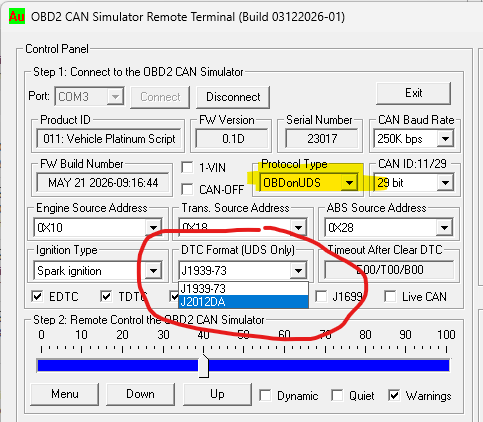
PICKit2 DIY Related FAQsQuestion1 - What tools do I need for components soldering? Question 2 - How to find the pin number on SMD package? Question 3 - Where to find application programs for PICkit 2? Question 4 - How to calibrate PICkit 2? Question 5 - How to trouble shoot PICkit 2? Question 6 - Can BB0703 (PICkit 2) work with board designed for ICD2? Question 7 - How to place order online for Au Groups products? Question 8 - How to program DIP PICs with Breadboard? Question 9 - How to Install a USB 2.0 Serial Converter? |